



Combat Ally
 views
viewsCombat Ally
With the release of patch 11.1.7, World of Warcraft introduced a new system called "Combat Ally".
It offers players two features — "Ability Highlight" and "One-Button Helper".
These tools are designed for new players who are still learning the game world and don't yet know all the intricacies of their class rotation. Thanks to this system, players can get up to speed faster and understand their class while being effective right away.
One-Button Helper
This is a universal ability that needs to be dragged from the talent window to your action bar.

In combat, it automatically transforms into whichever ability the system determines should be used next. The player simply presses the button as abilities come off cooldown, and skills will automatically be cast on the selected target based on a priority set by the game's developers. You can see the list of abilities by hovering over the helper button in the abilities section.
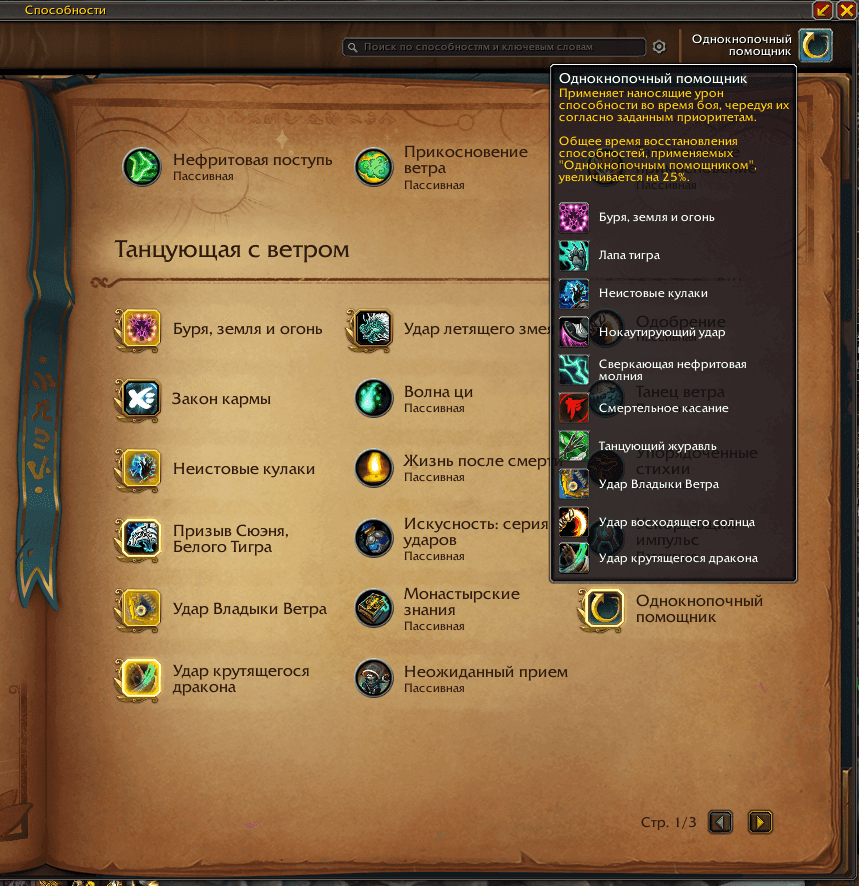
One-Button Rotation Features
When you press the button, the most appropriate ability for the current moment will be cast. The ability depends on your buffs, debuffs on the target, passive ability procs, and enemy health. However, it's important to understand that the system only uses core damage abilities. Many abilities fall outside this system and must be used manually. This means the game won't do all the work for you, requiring only the helper button press. It's just a tool that simplifies gameplay for beginners.
Abilities cast by the helper have a 25% increased GCD. This means you'll be casting abilities 25% slower than other players, which significantly impacts your damage output.
The One-Button Helper is not suitable for healers, as the system cannot know when and which ability should be used to restore health to the group or raid. You'll need to learn the basics of healing on your own.
The skill rotation cannot be manually modified by adding desired skills. The rotation is set by developers and cannot be externally altered.
In most cases, the system does not use powerful class abilities with long cooldowns (burst abilities). Players must activate these abilities manually.
Area-of-effect abilities will be automatically cast on the target without the player being able to choose the area of effect. This is important to consider if your rotation includes untargeted AoE abilities.
Ability Highlight
To enable "Ability Highlight", go to game settings and activate the corresponding option under "Gameplay" — "Gameplay Enhancements".
During combat, this feature highlights with a blue border the ability that is recommended to be used next. The principle is the same as the One-Button Helper, but here the player must independently decide whether or not to press the ability in the current situation. The system only suggests abilities for your rotation.

Ability Highlight Features
The system selects ability priority based on the abilities you've placed on your action bar. If an ability isn't on the bar, the system will choose from available alternatives even if the missing ability would be most effective at that moment. Therefore, it's important to have all primary and secondary abilities on your bar, even if you're not using them yet.
The system can be used alongside the One-Button Helper. This combination allows you to see additional recommended abilities that aren't included in the One-Button Helper.
The highlight feature is purely visual. Using it does not affect the GCD of abilities, making it more efficient in terms of damage output, but requiring more attention and class understanding from the player.
The highlight doesn't account for all class abilities and contains a pool of abilities set by developers, which also cannot be modified.
The feature considers many burst abilities, but if you ignore the recommendation and continue your rotation, the recommendation will change regardless of whether the ability was pressed or not.
General Recommendations
- Understand that this system does not turn gameplay into pressing a single button.
Using the feature will certainly be noticeably more effective than mindlessly pressing all buttons on the bar without understanding what each ability does. However, you will fall behind other players who don't use the One-Button Helper or who only use the ability highlight. We strongly recommend learning your class and abilities to be the most effective player and to enjoy playing your class.
- Just because the One-Button Helper is designed for beginners doesn't mean experienced players can't use it.
Using this feature in raids and keystones will only be detrimental, but there are many situations where this ability can be used effectively. For example, when grinding mobs for reputation, completing world quests, doing Delves, completing quests, and other content that doesn't require much attention. If your goal is to enjoy the game's story and not stress about learning a class, this ability is perfect for you.
- The recommended rotation is very simplified and far from optimal.
The rotation ignores many important conditions and may give suboptimal advice. Therefore, strictly following the recommendations makes it nearly impossible to achieve high performance — it all depends on the complexity of the specialization and class: the more complex it is, the worse these features perform.
- Abilities used by the highlight and One-Button Helper are highlighted in your Spellbook.
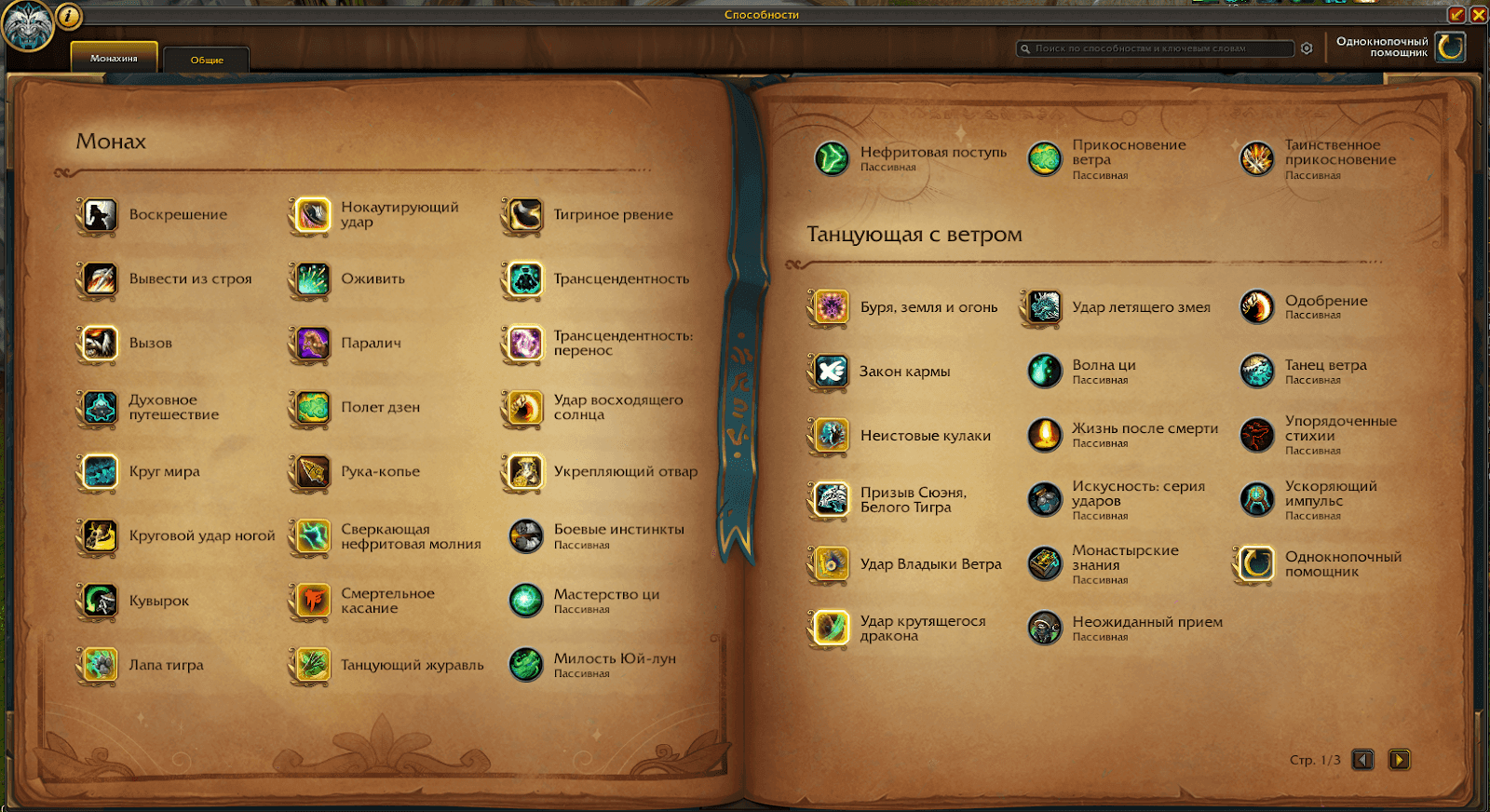
Make sure to place all these abilities on your action bar to see their cooldowns and to ensure the ability highlight system works correctly.
Remember, the purpose of these helpers is to help beginners learn the basics of gameplay for a new specialization or encourage them to develop their skills (including for independent play). They are also suitable for those who want to be effective players but cannot for one reason or another — for example, people with physical disabilities.
Author
Fouren
Fouren has been playing World of Warcraft for over 15 years. He is an active player with 12 Cutting Edge achievements under his belt, and has reached the top 1% and 0.1% multiple times on various classes. His main classes are healers, particularly Holy Paladin.

Comments
0No comments yet. Be the first to comment!