

Dungeon Finder System — Mythic+ Dungeon Guide
 views
viewsHow to Get a Mythic Keystone
You can get your first Mythic Keystone by completing any dungeon on Mythic difficulty. After completing it, loot the killed boss, and among the rewards you'll receive your first level 2 key for a randomly selected dungeon.
We covered Mythic Keystones and how they differ from regular dungeons in more detail in our guide.
Every Wednesday, you'll receive rewards from the Great Vault, which will include a key for a random dungeon at the highest key level you completed the previous week. For example, if your highest completed key last week was 12, you'll receive a level 12 key from the vault. If you had no keys completed in time, or your completed key with a broken timer was 2+ levels higher than your best timed key, you'll receive a key 1 level lower than your completed one.
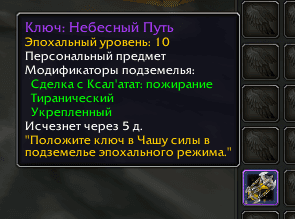
If you happen to lose your key or haven't logged in for a while and didn't receive a Great Vault reward, you can get a key from the special NPC Lindormi. You can find this pandaren in Silvermoon City near the portal that leads you to the current season's dungeons.
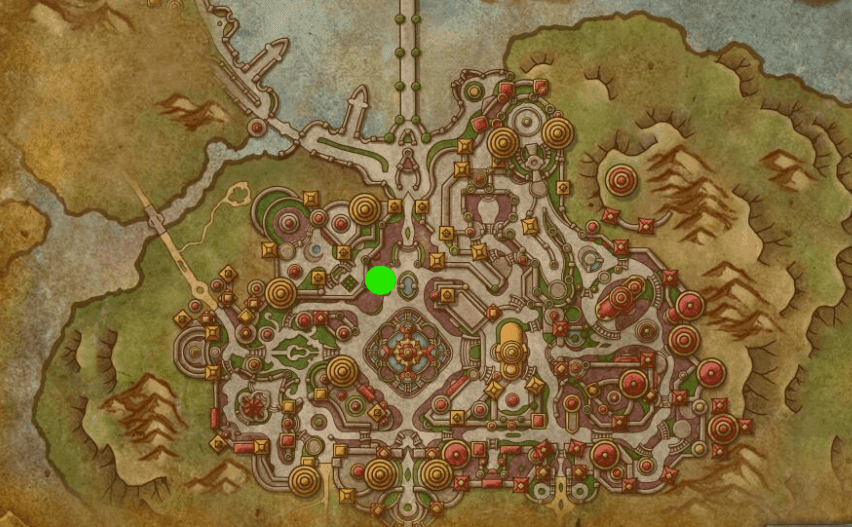
She's located to the left of the portal and will offer to restore or issue your key. If you accidentally destroyed or lost your key, Lindormi will give you a key at the level you lost. If you haven't logged in for a while, depending on how long you were away, you'll receive either the key that was issued in your last Weekly Vault or one corresponding to that level, or a level 2 key.
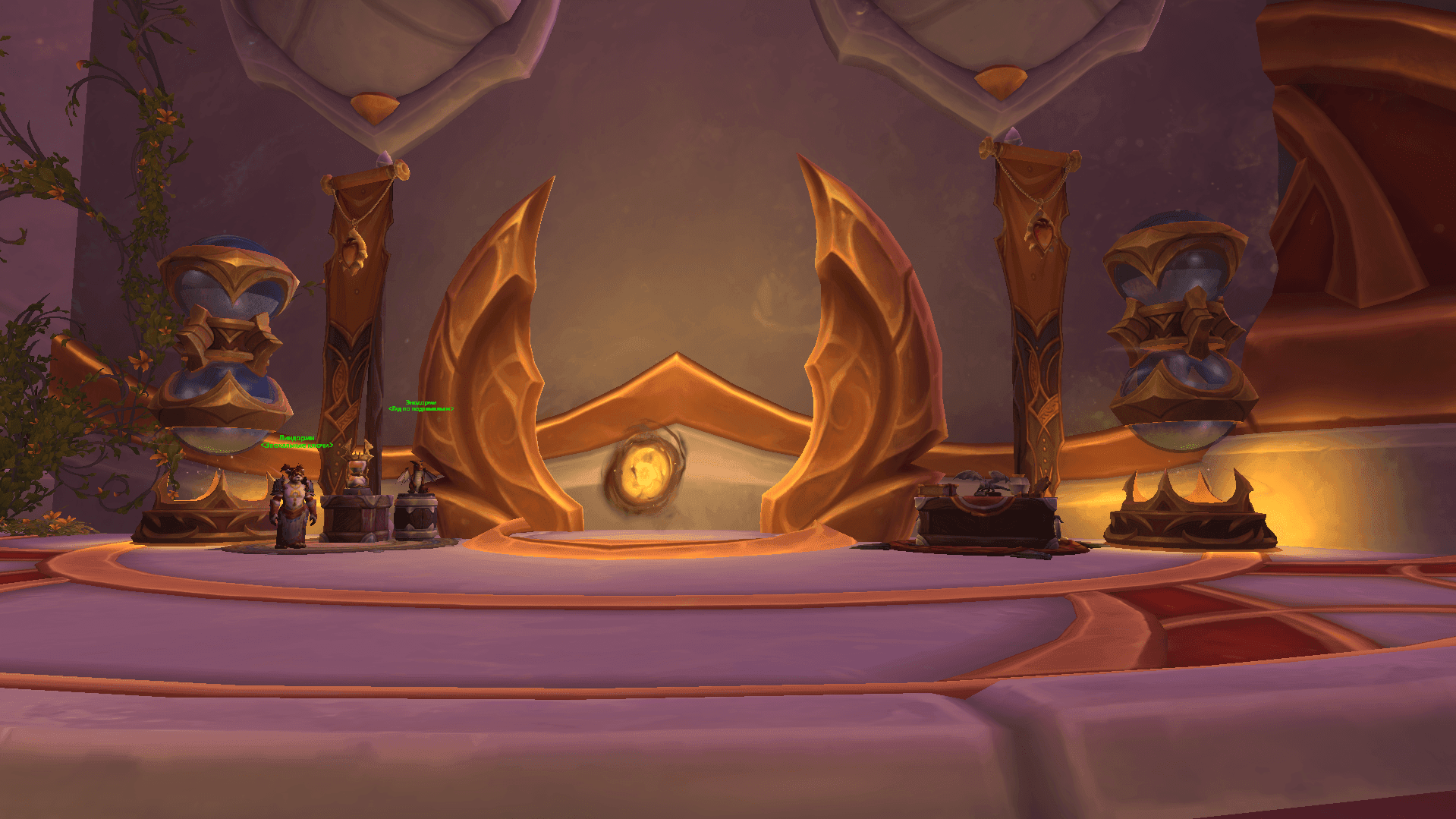
Lindormi can only give you a key if you have previously received one from the vault or a dungeon. Your very first key must be obtained from any Mythic dungeon.
Group Finder System
After getting your first key, you'll need to assemble a group to complete it. If you have a ready group of friends or guildmates, you can simply form a party and head to the dungeon you need. But what if you don't have such a group?
In that case, the special dungeon finder system comes to the rescue. You can access it by opening the dungeon finder menu by pressing I or clicking the green eye in the menu. Then navigate to Premade Groups -> Dungeons. You'll arrive at the menu for listing your key.
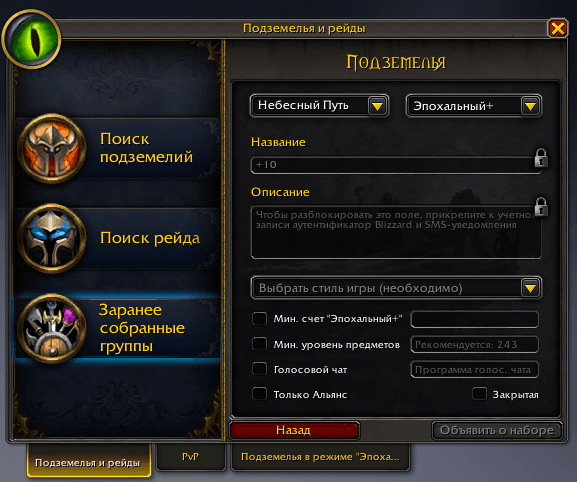
Here you can specify all the requirements you want from the players you're looking for.
Choose a Playstyle
In this section, you can indicate how serious your intentions are. You're given four options:
- Learning
This level means you're still learning the dungeon and may not know certain mechanics, routes, or dungeon-specific features. This option is suitable for beginners who are learning the game and are prepared for their key not being completed within the time limit.
- Casual
At this level, you may make mistakes, but you already have knowledge about which dungeon you're entering and what challenges might await you. Nevertheless, you're also prepared for things not going according to plan. This difficulty is suitable for those who enjoy running dungeons and socializing with players without demanding perfect knowledge and skill level.
- Serious
Choosing this option means you should know all the ins and outs of the dungeon, understand the route, and strive to execute all mechanics perfectly, as well as possess knowledge about the class you're playing to deliver good damage/healing/survivability. This is the difficulty level for players who are focused on results and completing the key in time, and who are looking for like-minded players.
- Carrying Weaker Players
This option means you have good knowledge and gear and are ready to help beginners who are just getting started in the game. Choosing this implies that you will be the strongest player in the group, helping others gear up and learn the dungeon. With this difficulty selected, don't expect strong players to join your group, so don't get angry or demand specific knowledge from players. In this role, you're a mentor ready to help with both advice and a strong presence.
You can use this difficulty, for example, when running dungeons at a lower level than you need for key progression, to earn currency for gear upgrades, knowing that minimal assistance will be enough for a successful key completion.
Minimum Mythic+ Score
In this section, you can specify the minimum rating a player must have to join your group. Players whose rating is below the specified value won't see your dungeon listing and won't be able to apply.
Don't set a high rating in this field if you're not listing a high-level key. Players with high ratings tend to run higher-level dungeons and are unlikely to join a group where the dungeon level is lower than what they've previously completed. Expect that suitable players will have roughly the same rating as you, so this option is best used only when you're looking for a group for a high key and need players with high ratings.
You cannot set a rating higher than your own.
Minimum Item Level
This setting works on the same principle as the minimum rating. However, instead of filtering players by their rating, you'll be filtering them by their gear level.
The field will show the recommended gear level for your key. If you want to filter by this criterion, we recommend setting a value within the game's suggested range.
You cannot set an item level higher than your own.
Voice Chat
Here you can provide a link to your Discord server or another way to communicate with players. Keep in mind that this option is useful when you're running a high-level key where voice communication and coordination are necessary for successful completion. Players are unlikely to want to join a voice channel for an easy key or while farming resources. But who knows — it could be the beginning of a beautiful friendship!
Alliance/Horde Only
In the group finder system, you can accept players from any server and faction. This setting allows you to hide your key from players of the other faction if you wish.
Private
This setting allows you to hide your key from all players except those in your guild or on your friends list. You can use it if you don't want to run the dungeon with strangers.
When selecting this option, you can notify your friends or guild members through chat. This will speed up the group assembly.
List Group
After setting all your desired parameters, you can create your key listing. After pressing this button, a menu will open where players wanting to run the dungeon with you will appear. You'll be able to see their item level, rating, best key completions, as well as their role, class, and specialization. All you need to do is choose the ones that suit you.
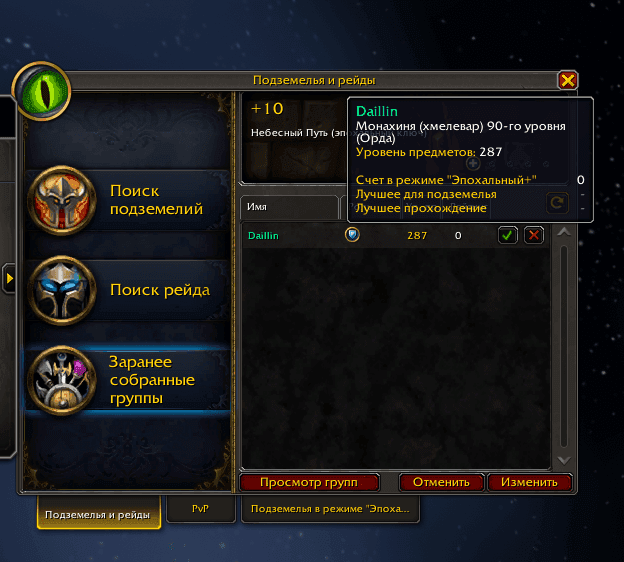
How to Find a Group
Besides listing your own key, you can also find a group among other players. In this case, you'll be the one joining a group, which means you'll have new key filtering options.
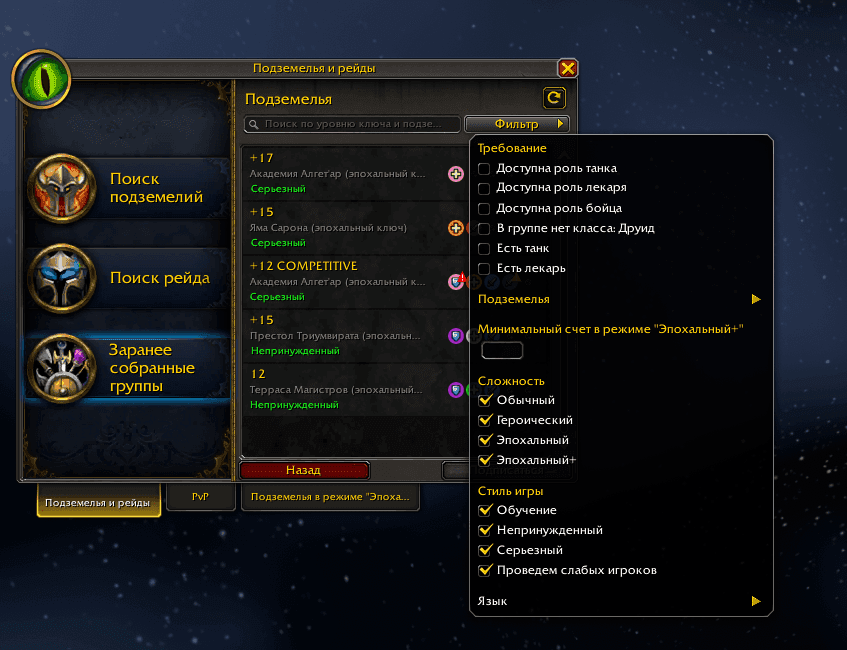
Requirements
Here you can filter groups for your role. For example, if you play a healer, groups that already have a healer aren't relevant to you. Check the Healer role available box and you'll only see keys where that role is open.
This filter helps find groups faster if you play DPS. Check Has tank and Has healer and you'll only see keys that already have a healer and tank, which typically take the longest to find.
Dungeons
In this section, you can select a specific dungeon you want to run. You can choose one specific dungeon or several, removing those you're not interested in.
Minimum Mythic+ Score
This filter is similar to the one used when creating a key listing, but now it will remove from search results players who don't meet the specified parameter. For example, if you're looking for a high key level and have a high rating, you can filter out those listing lower-level keys or whose rating doesn't meet your expectations. This will significantly reduce the number of found keys but will help find the most suitable match for your skill level.
Difficulty
Here you can select the dungeon difficulty. Since you can list groups not only for Mythic Keystones but also for other difficulties (without a Mythic Keystone), you can specify the difficulty here. For example, if you don't have a key yet and want to run a Mythic dungeon to obtain one.
Playstyle
In this filter, you can specify the difficulty level that suits you. This way, you'll only see keys that match your skill level or mood.
Don't select an inappropriate level just to find a key faster. This filter carries a certain obligation to other players. For example, if you select serious play and don't have sufficient skill and dungeon knowledge, you'll ruin the run for both yourself and other players. This can lead to certain negative consequences, which we'll discuss below.
Language
Here you can choose which language of interaction with players suits you. Language is also tied to the region where you'll be searching for keys. This allows you to see more keys and run dungeons with players from other countries, but you need to have sufficient language proficiency to interact with them.
Penalties and Punishments
As we mentioned earlier, the game has introduced a system for dishonest players. It's important to understand that a created key is not just a dungeon — it's an item that increases or decreases in level depending on how successfully the dungeon is completed. If a player aims to raise their key level, they're interested in other players taking it seriously too. If something goes wrong, players can initiate a vote to end the dungeon run early and not waste time. Only after other players vote can you leave the dungeon. If you leave without a vote — by leaving the group or closing the game — you'll receive the special Mythic Deserter mark, which indicates that you previously abandoned a key. This mark significantly reduces the chance of being accepted into a group, as players will know that someone with this mark might leave the dungeon and ruin the run.
This mark disappears over time or after you complete several dungeons to the end. But if you enter a dungeon with this mark and leave again, you'll be locked out and won't be able to list or join other players' keys for some time.
Groups with such players will also be flagged for others if a marked player tries to list their key or joins someone else's group.
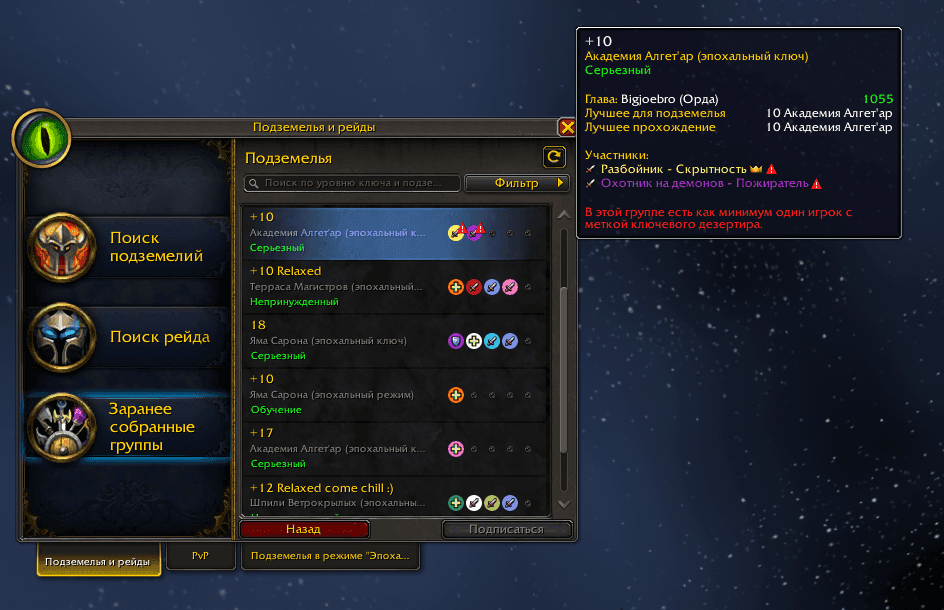
Players can also report you if you're being toxic in chat, intentionally sabotaging runs, and for many other reasons, including your gameplay performance if you joined a key marked as serious play. In this case, you won't receive the mark, but you'll receive a ban. This can be a chat ban or a full account ban. The ban can range from 7 days to permanent, depending on the severity of your violations and how frequently they occur. A chat ban also restricts all social aspects of the game. You won't be able to join or invite players to groups, search for or create keys, run dungeons and raids through automatic group finder, complete world quests, use mail and the auction house, and perform many other actions that require interaction with other players. The ban also extends to other Blizzard games, as the restriction is applied to your account, not just the game. Be careful and mindful!
What to Do After Assembling a Group
So, you've got your key and assembled a group of players. What's next?
Now you need to set the dungeon difficulty to Mythic. You can do this by clicking on your character portrait (or the health bar if you use addons) and navigating to Dungeon Difficulty.
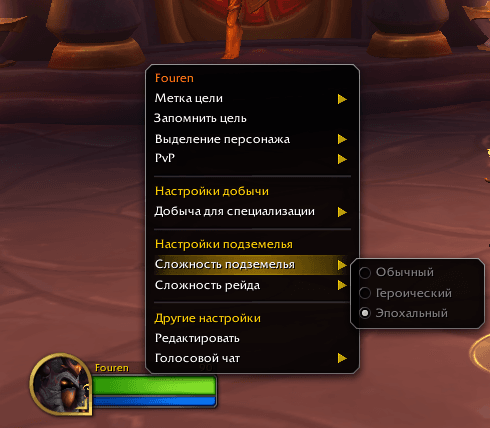
After setting the dungeon difficulty, you can enter the appropriate dungeon. Inside, you'll see a special font (pedestal) where you need to place your key.
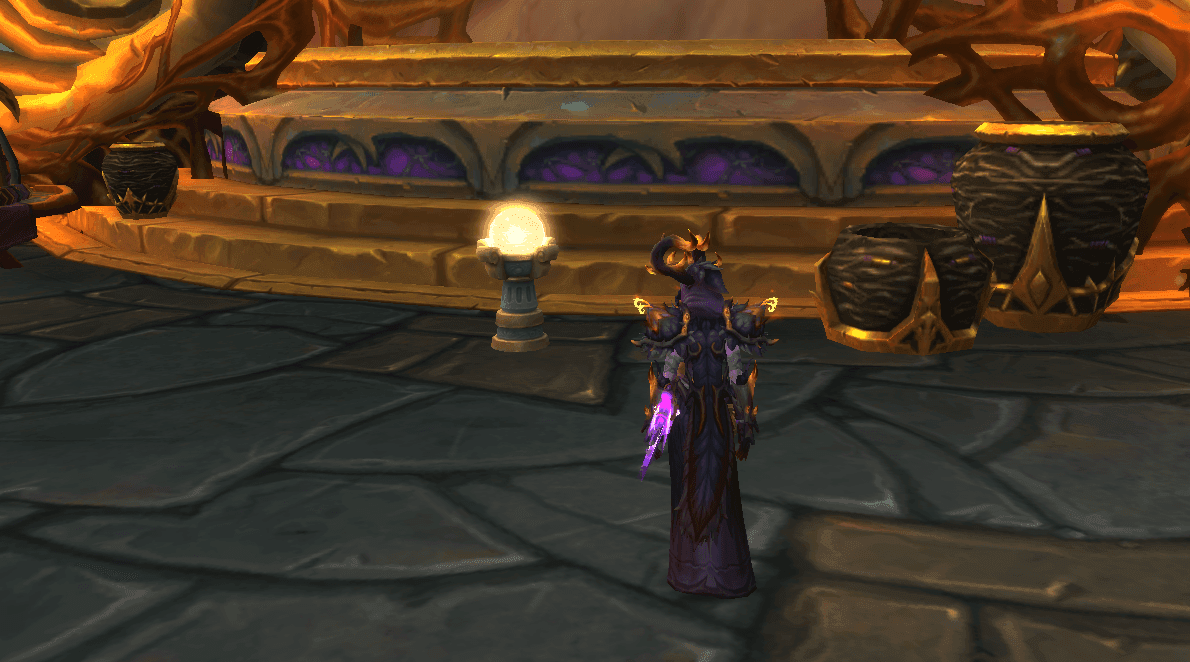
Use your group blessings, consumable items, and verify that your talents and specialization are set correctly. Then approach the font, check the readiness of other group members, and insert your key. You'll see the key level, the time allotted for completion, and the affixes that will be applied at the start of the dungeon.
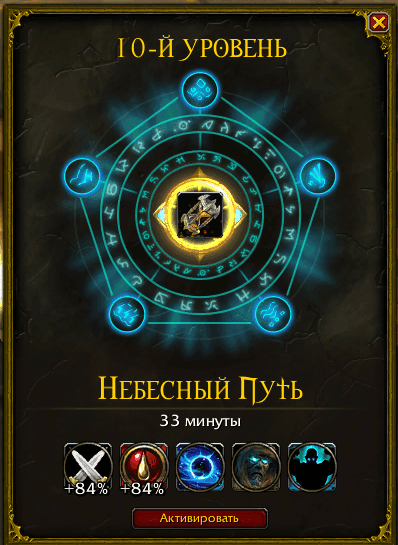
After pressing the Activate button, the dungeon will reset and a 10-second countdown will begin. Once it ends, you'll start the dungeon at Mythic difficulty.
Good luck!
Author

Fouren
Fouren has been playing World of Warcraft for over 15 years. He is an active player with 12 Cutting Edge achievements under his belt, and has reached the top 1% and 0.1% multiple times on various classes. His main classes are healers, particularly Holy Paladin.


Comments
0No comments yet. Be the first to comment!