



Get Crimson Glimmerfur mount
 views
viewsOverview
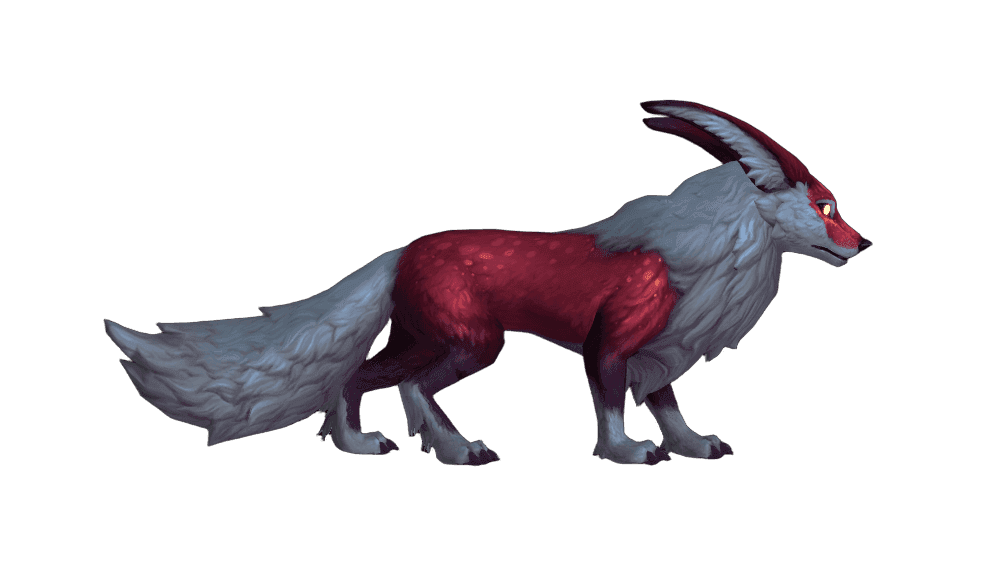
 Crimson Glimmerfur is an uncommon ground mount added to World of Warcraft in the Dragonflight expansion (patch 10.2, "Guardians of the Dream"). It is an elegant red-and-white fox with shimmering fur.
The mount is sold periodically at the Trading Post for Trader's Tender and has no raid, reputation, or other requirements. The base price is 600 tender, but in February 2025 the Glimmerfur returned at a discount and cost 500 tender. As of patch 10.2.5 the minimum level to use it was lowered from 45 to 10.
Why You Want This Mount
- Unique model — a large red-and-white fox with shimmering fur. One of four decorative "glimmerfur" variants
- Festive theme — the coloring nods to Feast of Winter Veil, so the mount fits perfectly into winter and holiday collections
- Account-wide — once purchased, the mount unlocks on every character on your account regardless of faction, race, or class
- No complicated farming — no raids, M+, or PvP. You just save up tender through the monthly chest and the Traveler's Log
- Speed 10 out of 10 — a ground mount gains a +60% or +100% movement speed bonus depending on your riding skill
- Low entry level — after patch 10.2.5 you only need level 10 and the basic "Apprentice Riding" to ride it
How to Obtain
The mount's only source is the Trading Post. You can buy it only in the months when it is included in the rotation. Confirmed rotations: December 2023 (debut), July 2024, February 2025.
- Open the Trading Post interface and check whether Crimson Glimmerfur is in the current monthly inventory
- Save up 600 Trader's Tender (or 500 if a discount rotation is running)
- Open the Trading Post catalog, add the mount to your cart, and confirm the purchase
- The Crimson Glimmerfur item will appear in your bag. Use it to learn the summon spell — the mount will immediately appear in the collection on all of your characters
How to Earn Trader's Tender
You can earn up to 1,000 Trader's Tender for free each month. That is enough to buy the Glimmerfur in a single active rotation month.
- Collector's chest — once a month, walk up to the chest next to the Trading Post vendor and grab 500 tender. The reward is granted once per account
- Traveler's Log — open the log with Shift+J and complete the monthly tasks (raids, dungeons, professions, PvP, etc.). Earning 1,000 activity points grants another 500 tender
- Freezing an item — if you came up short on tender this month, click "Freeze" on the mount. Next month it will stay in the inventory even after the reset
- Savings carry over — tender does not expire when the month resets. You can save up in advance to be ready when the mount appears
Preparing for the Purchase
- Check the Trading Post announcements at the start of each month in advance — Blizzard publishes the item list before the 1st
- If you missed February 2025, wait for the next rotation. The mount is a permanent part of the Trading Post's pool of returning items
- Don't spend all your tender on one item in the first week — you have the whole month, and you can change your mind within 2 hours of the purchase
Optimizing Trader's Tender Farming
The Monthly Cycle
The Traveler's Log refreshes on the 1st of each month. The earlier you start, the more comfortably you will reach 1,000 activity points.
- On the first day of the month, head to the Trading Post and grab the Collector's chest — this automatically gives 500 tender
- Open the Traveler's Log and review the available tasks. Prioritize universal tasks (running dungeons, completing world quests, leveling your character) that are easy to clear along the way
- Knock out the bonus seasonal tasks: they often give more points and can be completed in one go
- Track your progress — the activity meter shows how much more you need to reach 1,000 points
What to Do in the Off-Season
If the mount isn't in the rotation right now, keep saving tender. The wallet cap is 1,000 tender per month per character, but the overall account stockpile is unlimited.
- On every active character, complete the monthly Traveler's Log
- In months with an uninteresting inventory, set tender aside for future rotations
- A World of Warcraft subscription is a mandatory condition for receiving the Collector's chest
Freezing a Slot
Each month you can freeze one item, which will stay in the inventory through the reset. Use the freeze strategically.
- If you opened the Post and saw the Crimson Glimmerfur but don't have enough tender — freeze it right away
- Don't try to freeze several favorited items at once — you can freeze only one
- After you buy the frozen item, the slot frees up and you can freeze a new one
Tips
Make a habit of checking the Post on the 1st — some items appear for just one month and then may not return for 6–12 months
A subscription is mandatory — without an active subscription the Collector's chest is unavailable. Game time paid for with subscription tokens also counts
Use the 2-hour refund window — if you accidentally bought the wrong item, you can refund the tender through the Post interface within 2 hours of the purchase
Don't ignore old Log tasks — even if they seem boring, many can be cleared in 5–10 minutes and bring you closer to the 500 activity tender
Freeze the mount at the first opportunity — even if the end of the month is still far off and you plan to make it in time, freezing insures you against emergencies and against pushing the purchase to the next rotation
The mount unlocks account-wide — after purchase, Crimson Glimmerfur will appear in the mount collection of all your characters regardless of faction
Author

Malavita
Malavita first discovered World of Warcraft in Draenor, but truly got into the game with the Shadowlands expansion. Has a soft spot for Demon Hunters and Mages. Considers her main goal to be collecting as many mounts as possible.


Comments
0No comments yet. Be the first to comment!