

Get Mystic Runesaber mount
 views
viewsOverview
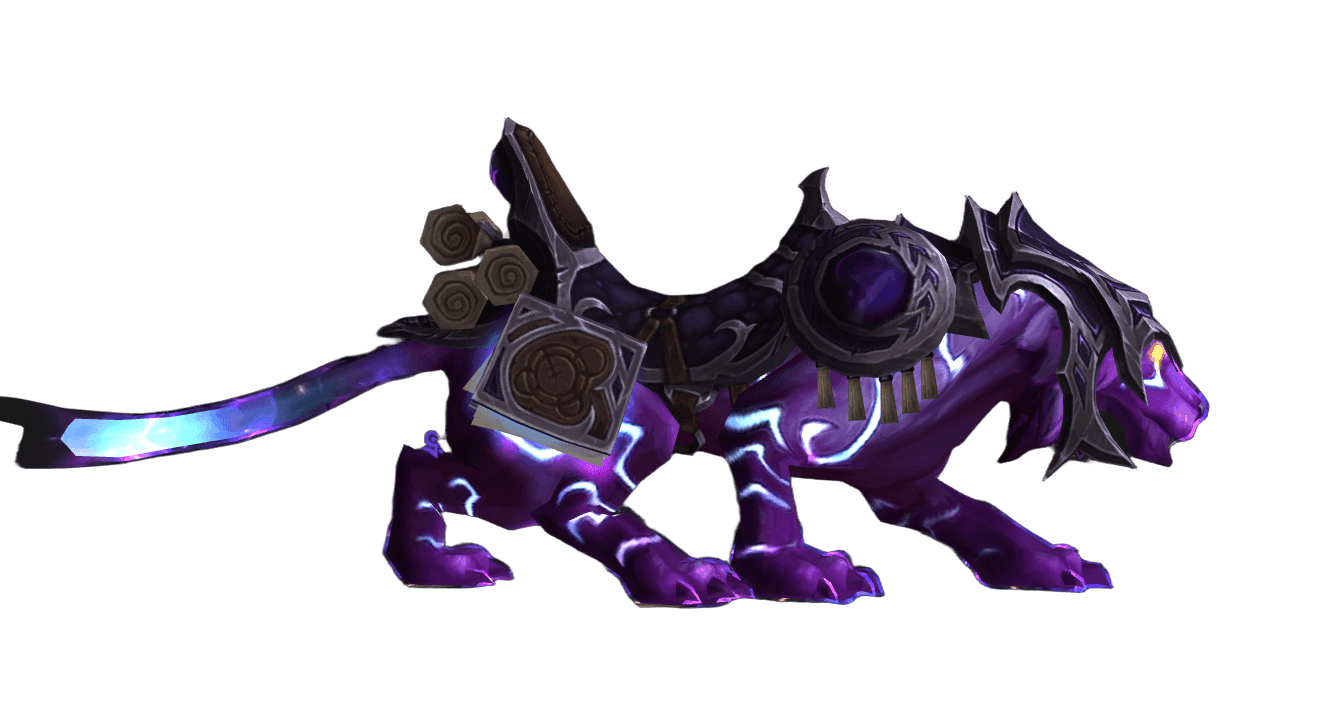
 Mystic Runesaber is a flying mount from the manasaber family, first added to the game in the Warlords of Draenor expansion and released in the in-game store on May 13, 2015. It is a sleek purple feline figure adorned with glowing arcane runes and wings made of pure magical energy.
The mount is account-bound: once the purchase is activated, it appears in the collection of every character on your World of Warcraft account. In patch 11.1 the Runesaber gained flight support, so it can be used for both classic steady flight and dynamic skyriding with boosts and maneuvers.
Why Get This Mount
The Mystic Runesaber is valued for several reasons:
- Unique model. An arcane manasaber with runes and magical wings looks striking both at rest and in flight.
- Dragonriding. The mount supports the modern skyriding system — you get boosts, turns, and vertical maneuvers, just like on the dragons of the Dragon Isles.
- Account-wide access. A single activation unlocks the mount for all characters, including future ones.
- Low level requirement. A minimum of level 10 — you can hop on it right after acquiring the riding skill.
- Stable availability. The mount is always in the store; you don't need to farm it, and it doesn't depend on raids or seasonal activities.
If magical, glowing, and elegant models matter to you, this is one of the best candidates for your collection.
Requirements
To use the Mystic Runesaber, you need to meet several conditions:
- An active subscription to World of Warcraft or active game time.
- Character level 10 or higher (level 20 was previously required; it was lowered in patch 9.0.1).
- The riding skill — any rank, including Apprentice, which unlocks for free at level 10.
- A payment method linked to your Battle.net account or a purchased key with a mount code.
- For flight in current zones — flying enabled (default in most The War Within zones) or dragonriding.
- For skyriding — the dragonriding skill learned (granted automatically in modern expansions).
There are no race or class restrictions — the mount suits any character of any faction.
Step-by-Step Guide
Obtaining the Mystic Runesaber takes a few minutes. Here is the order of actions:
- Open the shop. In the game, click the shop icon at the bottom of the character screen, or go to shop.battle.net and log in to your Battle.net account.
- Find the mount. In the World of Warcraft section, select the "Mounts" category and find the Mystic Runesaber. If you use a direct link, make sure the cart shows your current game account.
- Complete the purchase. Choose a payment method, confirm the region, and finalize the order. When buying in the game client, the mount appears immediately; when buying through the website, you may need to log back into the game.
- Receive the mount in-game. Open the mailbox in any major city — you'll get a letter from Blizzard with the "Mystic Runesaber" item.
- Use the item. Right-click the item in your bag. The mount will be added to your collection permanently for the entire account.
- Open the collection. Press the default key combination Shift+P or open the Collections journal and go to the "Mounts" tab. Find the Runesaber and summon it with the "Summon" button.
- Test it in flight. In zones where flying is allowed, press the spacebar to take off. In dragonriding zones, the mount automatically switches to skyriding mode.
If the mount doesn't arrive in your mail within a few minutes, check the order status in your Battle.net account and make sure the purchase went through on the correct game account.
Optimization
To use the Mystic Runesaber as efficiently as possible:
- Assign a hotkey. In the mount collection you can favorite your preferred mount and summon it with the
/usecommand or a macro bound to a convenient button. - Smart summon macro. Create a macro with a summon command so that in zones with flying it automatically summons a flying mount, and on the ground a ground one.
- Skyriding. In the open zones of Khaz Algar and other The War Within territories, use dragonriding mode — it's faster than the classic one. Support turns on automatically once you learn the dragonriding skills.
- Switching styles. In the mount collection menu you can choose between regular and dynamic flight for zones where both modes are available.
Tips
Watch for regional promotions: Blizzard periodically runs discounts on store mounts of up to 50 percent.
If you buy a mount code from resellers, make sure the code's region matches your account's region (EU/US/RU).
This mount is unavailable on the old Classic and Wrath Classic servers — it only works in Retail.
For beautiful screenshots, visit nighttime locations with an arcane ambiance: Suramar, Azuremyst Isle, or the Vale of Eternal Blossoms — the runes on the mount glow beautifully.
If you already have the mount on your account, a repeat purchase is impossible — the system will warn you about this before payment.
Author

Malavita
Malavita first discovered World of Warcraft in Draenor, but truly got into the game with the Shadowlands expansion. Has a soft spot for Demon Hunters and Mages. Considers her main goal to be collecting as many mounts as possible.

Comments
0No comments yet. Be the first to comment!